
What does the Space World have to offer?

Control via the command center

Line-following driving robots

Mini flying robots with distance detection

Space Garden - Planting like in space
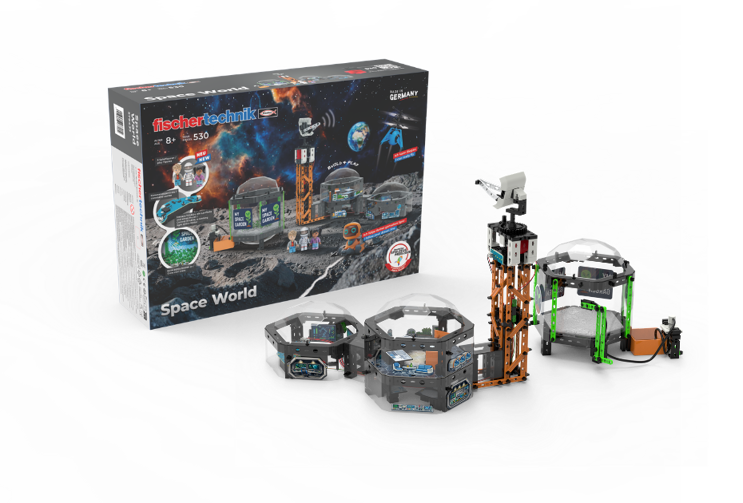
 

Control via the Command Center

The Control Board in the Command Center

The command center is the technical heart of your Space World. Here is the control board, with which you can activate various functions of the space station. The board has four switches. Each switch controls a different area of the space station:


1. Running Light in the Command Center

Turn on the running light on the control board and watch as the LEDs light up one after the other. This creates the impression of an active control and monitoring center.


2. LED Light Strip in the Workshop

This switch turns the workshop lighting on and off. This brightly illuminates the astronauts' work area.


3. LED Light Strip on the Transmission Tower

Activate the lighting of the transmission tower. The LED light strip ensures that the tower is clearly visible even in the dark.


4. Radar on the Transmission Tower

With the fourth switch, you start the motor in the transmission tower. This sets the radar in motion and simulates the search for signals and spacecraft.

Mobile Robot with Line Following

How it works: 

The mobile robot is equipped with an optical sensor that can detect black lines on white paper.

How thick the line should be:

The drawn lines should have a specific thickness. The line must be black and fully filled in. See the illustration on the left side.


Game Instructions:

  1. Draw a line on a white sheet of paper using a black wax crayon or felt-tip pen.
  2. Set the lower switch of the robot to ON.
  3. Place the robot on the drawn line.
  4. The robot will automatically follow the line.
  5. If the line is too thin, the robot may deviate from the line. Please draw the line thicker.


Helpful Tips

Battery Replacement

Use a screwdriver to loosen the screws of the battery cover on the back of the robot head and then open the battery cover.

Note

Very bright light or direct sunlight can cause the line not to be detected.

Mini Flying Robot with Distance Detection

Charging Information:

The mini flying robot has a rechargeable 3.7 V battery with 80 mAh. It is charged via the included USB cable.


Charging Instructions:

1. Set the switch on the mini flying robot to OFF.
2. Connect the USB cable to the mini flying robot. The red LED lights up during charging.
3. Once charging is complete, the LED turns off. 
Charging time: 20-30 minutes, playtime: 5-8 minutes

Control with the hand sensor:

1. Turn the switch on the mini flying robot to ON, then it will fly upwards.

2. If it starts to descend, hold your hand under the mini flying robot, then it will fly upwards again. The hand should be about 15-20 cm below the mini flying robot and not touch it.

3. Remove your hand, then it will start to descend again; hold your hand underneath again, then it will fly upwards again. This way you can control it stably in the air.

4. For uncontrollable flights, you can turn the flying drone on and off with the supplied remote control.

5. When not playing, leave the switch in the "OFF" position.

Instructions:

Get ready to encounter new galaxies. Send the mini flying robot to meet aliens. Equipped with infrared technology and sensors. You control its flight with your hand or maybe with another object (book, magazine). Train your astronaut – send him on a mission into space.


Important!

For indoor use only. Protect face and eyes. Do not put fingers into the
rotating propellers and keep them away from people and animals. Do not play under high-voltage power lines.
Be aware of obstacles while playing.

Space Garden - Planting Like in Space

In the Space Garden, you can become a space researcher yourself and observe how plants grow. With real cress, you conduct your own small plant experiment.


How to do it:

1. Place the supplied cotton wool into the Space Garden module.

2. Distribute the cress seeds evenly over the cotton wool.

3. Fill the water tank with water.

4. Gently water the seeds with the water spray so that the cotton wool is evenly moist.

5. Place the Space Garden in a bright spot, but not in direct sunlight. Make sure to keep the cotton wool lightly moist regularly.


After just 1 to 2 days, you can discover the first seedlings. Observe daily how the cress grows and learn in a playful way what conditions plants need to grow.


Note: 

The cress is intended exclusively for the experiment. Not suitable for consumption.

cd-blue-7fd6df45cb-zpchx